.png.dd2b432ae1812ea1fd2f38a267de1517.png)



Booper Scooper
-
Posts
1457 -
Joined
-
Last visited
-
Days Won
30 -
Steam ID
76561198381014852 -
Gametracker
Booper Scooper -
Player Profile
View
Content Type
Profiles
Forums
DarkRP Server Rules
Forum Rules & Guidelines
DarkRP Server Rules (Compat Test)
rules-compact-manual
Everything posted by Booper Scooper
-
I am the person who declined your appeal. You were banned multiple times throughout your time on the server. All of your bans but one is for RDM. The only other ban you had was for Mass NLR (which is still not a good thing). Here is a screenshot: http://prntscr.com/lcvvpo You need time off the server before playing again. From what I see with your bans, you just come back a little while after being banned and then break ANOTHER rule. If you did not have as much bans on your record, then no, you wouldn't have been banned permanently. Also, don't get me wrong. I understand that some of your bans were "separated" from each other by a somewhat good time, but regardless it is still on your record. And it will stay on your record indefinitely. You may re-appeal your ban at a later date.
-
Discord Moderating 101 Welcome to the Discord moderation team! You've been given access to some additional tools as a Senior Moderator because you have proved yourself trustworthy and reliable. In this guide we will cover the community guidelines, commands, audit logs, and standards for the TitsRP Discord server. Keep in mind that there are more than 5,000 members in our server. If you want to take a deep dive on how to operate a Discord server, check out the Discord Safety Library. From there, scroll down to the topics list and select Moderation. Community Guidelines These are the Discord rules you are expected to enforce and can be found in #rules Be respectful to other people and players. Racism is not allowed. Read each channels subset of rules on the header and or first post. Being silly and trying to test the rules will most likely get you slammed. Posting other user's information / pictures without permission will result in an immediate slam. Private message a staff member if you have an issue Warn appeals / ban appeals happen on https://titsrp.com/ not here Pinging people for no reason is a no go. Spamming is a no go. Causing drama is a no go. Advertising other servers / discord is a no go. Breaking rules outside of TitsRP and having it reported to us may result in equal punishment here. You are responsible for your own actions. Examples: Excessive racism, excessive harassment, excessive bullying, causing harm to other community members or communities Commands Note: In the past we used DynoBot to execute these commands. As of 2024 you will need use the native Discord mod commands instead. All of these commands are logged to the Audit Logs and can be executed by right clicking on a user's name anywhere on Discord or running the /alias command in chat if one exists. Misuse of these commands will have your Discord Mod permissions revoked. Legend: Command | Description | Alias Timeout | Temporarily prevents a user from sending messages, reacting, joining voice channels, and video calls | Mute, Temp-ban, /timeout You can Timeout someone by right-clicking on their username. A modal will appear asking you to select a time for how long you want to Timeout the user for and a reason. You must include a reason for logging purposes. Ban | Permanently bans a user from the server | /ban Server bans are permanent and may be issued for serious or repeated rule violations or for any action that violates Discord's Terms of Service. When banning a user, you will be asked to provide a reason - you must provide a reason for logging purposes. You will also be asked if you want to purge the user's message history. This should only be done in cases of spamming, doxxing, advertising, etc. Don't purge a user's message history unless you're absolutely sure it's no longer needed for logging purposes. There is no way to recover deleted messages. Under most circumstances, a user will be unable to join the server on any account unless they are unbanned (see below). If you aren't sure whether or not an action deserves a ban, go with a Timeout instead and ask a higher-up whether or not it should be escalated to a ban. Unban | Unbans a user from the server A user may be unbanned once they have posted an appeal to the forums and it has been accepted or in rare cases where the ban was false or issued in error. To unban a user, open the Server Settings menu, then click the Bans page in the Moderation tab. Search for the user you want to unban, click their name, then select "Revoke Ban". Kick | Kicks a user from the server and forces them to re-join. Strips all server roles | /kick A user may be kicked from the server for multiple violations of the community guidelines. In most cases, it's more effective to Timeout the user instead. When kicking a user, you must provide a reason for logging purposes. Audit Logs Note: Some logs are only available within the #discord-mod-logs or #discord-actions channels. These include Bot logs like message edit history, deleted messages, etc. The Audit Logs are where you can find usage history of all these commands. Audit Logs are different than #discord-mod-logs and #discord-actions logs because they only contain bans, unbans, kicks, timeouts, and name changes. If you need more detailed logs such as message edit history, deleted messages etc, check one of these text channels instead. There are two ways to view the Audit Logs, within the Server Settings menu and titsrp.com/dashboard/audit. The former only contains logs from the last 60 days or so, while the latter contains logs as far back as late-2023 when we first started storing logs externally. You will need to search one of the log channels within the server for logs from before late-2023. Moderator Standards In most cases, you would not have to use your powers. If you aren't sure, go with a lesser punishment first, then ask a higher-up whether or not it should be escalated. Lead by example. No one wants to see a person with moderator permissions sending NSFW memes in #general-chat. You cannot in good faith enforce a rule that you do not follow yourself. The rules are not infallible. The community guidelines are intentionally broad to cover a wide array of situations and there isn't going to be a rule for every specific thing. You should use your best judgement to only take action when it makes sense and not blindly follow the letter of the law. Don't be a robot. There may be situations where the user technically breaks a rule, but the message provides important context to the discussion. A punishment for this may be overkill if removing the user from the discussion garners a negative response from the community as a whole. Don't over-punish. Most of the rules and the punishments given out for a broken rule is common sense. Here's an example of an overkill punishment: Booper uses a slur one time in #general-chat and Walter the Assaulter permanently bans him Steveo69 posts a anime gif in #general-chat that is considered NSFW and Rubik permanently bans him Guide made by Baljeet (@Garv#8985), Booper (@Booper#1182), and Rubik (@rbik)
-
That picture says he is blue and only admins are blue. He is a head admin not an admin so you are lying. -1 for demote
-
This is a pretty good guide. Hope you continue to update it! Stickied.
-
Accepted. I will invite you into the gang tomorrow!
-
hecko and welcome to the Official Tard Guards' gang recruitment thread! RULES DO follow server rules. Not doing so will not only get you punished by a staff member, but you will also be kicked from the gang - regardless if you are an officer or not. DO be respectful to other gang members. Not following this rule can have you kicked from the gang for being 'toxic'. DO use common sense. DO keep the gang in good standing. (As in, don't JUST join for the perks or so. Help out on grinding or you will be kicked). DO report gang members who do not follow gang rules or server rules. Don't be bias or you will be in trouble. DO NOT raid other gang members. This is a huge NO. You will be kicked instantly if found out about that. (And proven to be true, obviously) DO NOT apply for any other gangs while you're still in this one. If you want to join another gang, then please contact an Officer or higher before doing so or you will not ever get to re-join this gang. DO NOT scam other gang members. You will be kicked if doing so. GANG INFO Gang Level 25 Roles Super Administrator (Owner) - Owner of the entire gang and can do whatever they want to. Head Administrator (Executive Officer) - Are able to punish officers as well as members. Can start official gang meetings. Administrator (Officer) - Officers are next in line of being an executive officer. They can kick members from the gang. User (Member) - Simple members who wait to be promoted to Officer by doing good deeds for the gang. Gang Mascot Kotos, the Cyclops Application Template In-game name: Server Rank: Amount of money: Favorite type of RP (Thief / Cop or Both) Age: Discord (Optional): Why do you want to join this gang (please put detail)?: Please do not shitpost by the way. PS: Shitposting on this thread will have your post deleted and you will be warned. ( https://www.titsrp.com/showthread.php?tid=5116)
-
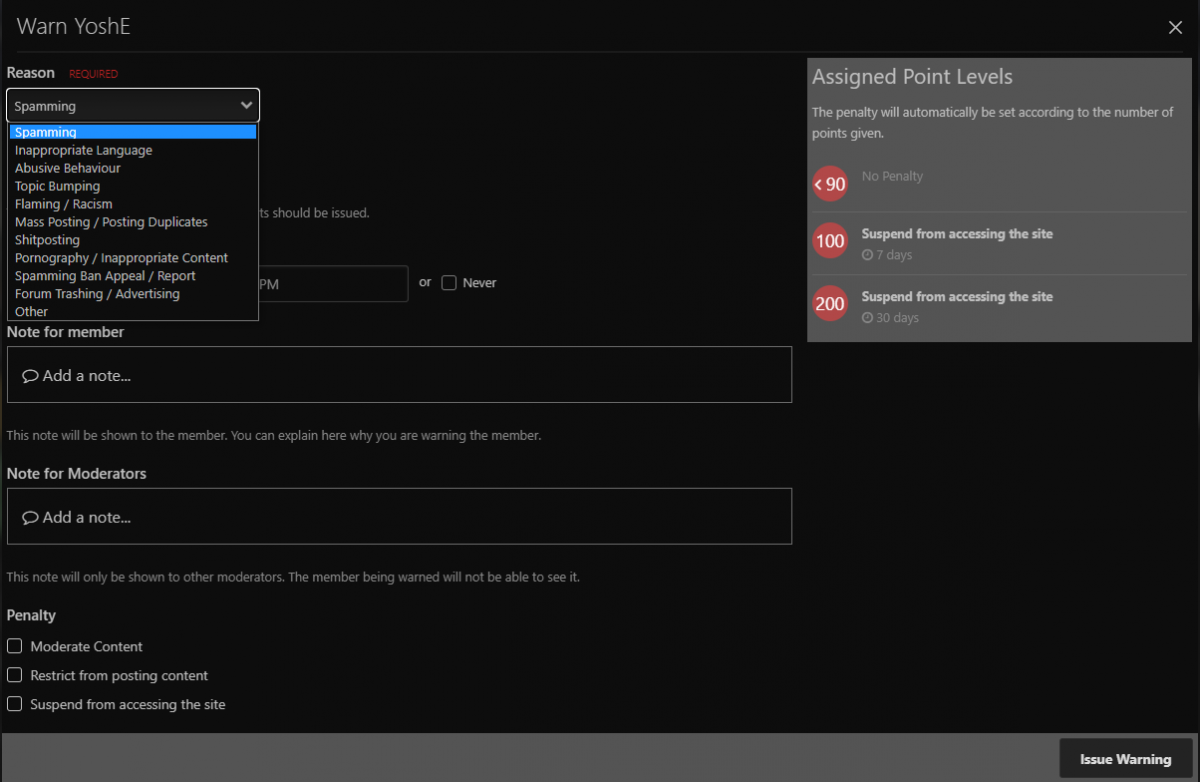
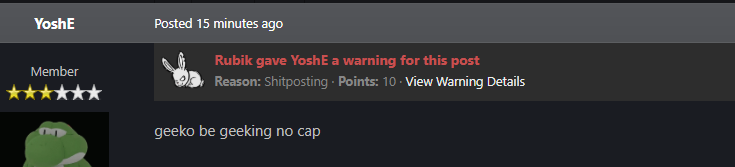
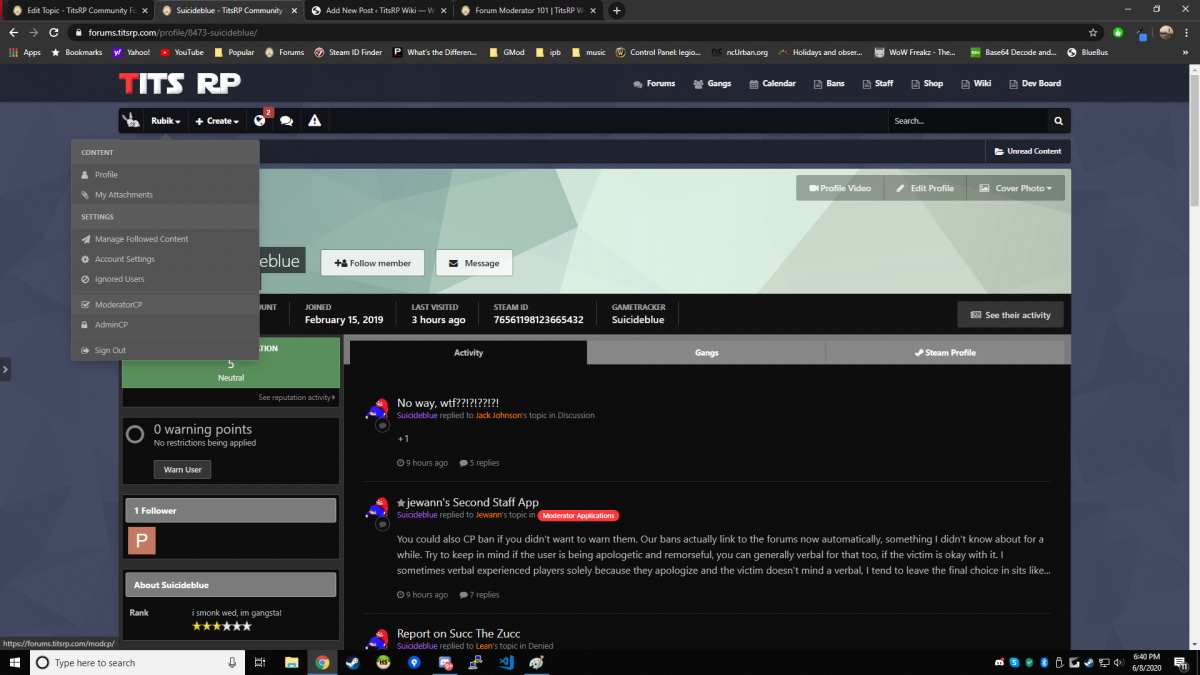
Forum Moderating 101 Introduction hecko! This thread is mainly focused on new moderators who don't really know that much about how to 'Moderate' on the forums. I have made a guideline that goes into basic commands you would use on the forums for the rest of your time being a Moderator and eventually going further. Take this advice from an Admin, if you really want to go further into the staff team (such as going for Senior Mod), you would want to know more things about the forums (and in-game, of course), but the forums is where it's all at (ban appeals, applications, reports, etc). Basic Command Usage Let us begin. Let's say you were to want to close a thread, and you don't really know how you would go about it. The first thing you would want to do is go the thread, then you would want to go to the 'Moderation Actions' tab at the top or bottom of the thread itself. You would then click the drop-down button and it presents you a list of commands you would want to use. In this scenario, you want to LOCK the thread, so you would then click on the 'LOCK' button. (Note: If the thread is closed, then you would see the option to open it. Do not go around opening/closing thread without someone's permission. This can lead to punishments.) Now, onto MOVING threads. You would click the 'Move' button. Then, you would want to select the destination forum and just check on 'Move'. Do not leave redirect links unless you feel it's absolutely necessary for players to find the new location. Warnings To warn a player, you can simply click on their warning level on their profile. By doing that, you would be brought to a simple little menu and then you would give your reasons why you are warning a person (Other) or choose one of the predetermined warns and the correct amount of points will be set automatically. You can also warn a player for their post. Clicking on a user's profile via the post you want to report them for will issue a warn related to that specific post. Banning Banning players is a lot different than before. With Invision Forums, bans are permanent and should only be issued by Administrators. As a moderator, you can temporarily suspend a user's account or posting privileges by issuing a custom warn. If a member reaches 10 warn points, they will be suspended for the following 7 days. If they reach 20 warn points, they will be suspended for one month. Use the warn system in the event you need to suspend someone's posting privileges, and if a ban is absolutely necessary, contact an Admin. To issue a custom warn, choose the "OTHER" option inside the warns page, and provide a valid reason, and 100 points for a week or 200 points for one month. If you need help with this or not sure how long to suspend a user for, contact an Admin. Forum Moderating Guideline RULES (DO's and DO NOT's) DO punish users who break our forum rules. Rules are located here: https://titsrp.com/showthread.php?tid=1847 DO read over the forum guidelines to figure out the punishments you can hand out DO contact a senior moderator or higher if you need help with punishing someone on the forums DO use common sense when moderating on the forums. DO NOT break our own forum rules. As a moderator, you're teaching the rules and enforcing them. You will be punished if you break a rule. DO NOT randomly close threads, make sure you actually have an idea of what's going on with the thread before closing it. DO NOT ban/warn other staff members the same rank as you or higher ranking than you. Tell a higher up before taking matters into your own hands. DO NOT ban/warn players for dumb reasons. Ex: "aheur forum warning is cool" DO NOT delete important threads, such as stickied threads (listed in 'Important Threads') or threads such as the MOTD. DO NOT close/delete reports/ban appeals on you. Ask a higher up to deal with it. DO NOT make FORUM ANNOUNCEMENTS. You should have NO REASON to do this as a Moderator. DO NOT edit a user's profile. You really shouldn't have a reason to do this unless their forum tag is racist or so. DO NOT over-kill a warn or ban. (Ex: Warning someone for 6 months for 50% for harassment is RIDICULOUS. Don't do it.) Staff Application Commenting Rules (DO's and DO NOT's) DO comment on staff applications. Commenting on staff applications is one of the main things you do as a moderator on the forums and it is best to give your own opinions as to why you would want someone to be a staff member or not. DO give a good reason as to why you wouldn't want someone to be staff. Saying "-1 he smells bad" or JUST "-1" will have your post deleted. (This also goes for +1s and Neutrals (+/-), don't just comment a rating. Actually, type so other people can have a good reason to rate their application too. Your opinion is very crucial when accepting/declining staff apps. DO make sure to check over their gametracker. This logs their activity and we do want to have active ONLY staff members on the team. Our gametracker is located here: https://www.gametracker.com/server_info/208.103.169.23:27015/ (Just scroll down and click the button that says "VIEW ALL PLAYERS AND STATS". PS: Their gametracker goes by STEAM NAME so put in their current steam name.) DO deny moderator applications where a user does not have the right amount of hours to be able to apply. DO NOT bandwagon. If you have your own opinion, then please do put it on the application. If someone starts yelling at you for putting your own opinion or so then they will be talked to. DO NOT be bias. +1ing your friend just because you are friends with them is NOT okay. DO NOT accept moderator applications. As a moderator, you cannot promote them. The higher ups will tend to that. DO NOT deny moderator applications that seem bad to you. Just put your response to their application.

-
Adios, Sammah. You were an overall great person / staff to be around. Hope to see you soon!
-

A moment that will be forever imprinted in memory
Booper Scooper replied to Pesky Bee's topic in Videos / Screenshots
Amazing -
I feel like this map is what the server needs so far. These extended areas / add ons to the map will bring more RP / potential god-like base designs. The current map right now is the most used map for darkrp from what I have seen. So with that being said, this new updated version of the map is going to be even more popular (hopefully). Not only that, but the ocean based off the screenshots look amazing. Finally doesn't look like Shrek took a crap in it. Has a very nice shade of blue.
-
So Me and Navarog Tried some Aim bot the other day.....
Booper Scooper replied to Jacket's topic in Videos / Screenshots
banned -
The map is looking great so far from the screenshots. Can't wait for it to come out
-
Hi, just to make an official announcement that the staff application template has been revamped / changed. If you have any questions, please PM me or Walter the Assaulter via Discord / Steam!
-
[Meeting Schedule] Airsoftfatty Fanatics / Administration
Booper Scooper replied to Booper Scooper's topic in Discussion
Due to the fact we've missed all of our meetings (besides 1 which lasted too fucking long) Thread Closed -
If you want to post something you don't like about the gang update that could be improved then by all means you can post it here. This is a discussion thread of it after all.
-
So far, here's what I think of the gang update: It gives players a chance to grind to get more things to do and the talents are an interesting feature Features like fishing is nice and casual and that's what I like about it The new jobs bring more RP to the server and the new things added to the job (such as Picolas Cage being able to get cereal to make a wish) makes the game even more interesting. I had an entire list about what I think, but these are the only ones I wanted to post for now.
-
Yeah. Seems about right
-
[Meeting Schedule] Airsoftfatty Fanatics / Administration
Booper Scooper replied to Booper Scooper's topic in Discussion
Monday - 5:00 PM EST Added a snake tag probably gonna miss the meeting lol -
It's been almost an entire year since the Gang Update was launched (it launched Oct. 31st 2017) and I was wanting to know what are your thoughts about it? How has it affected your experience on the server? To anyone who hasn't seen what the full changes were, here's the full changelog of when it first came out:
-
[Discord Role] Airsoftfatty Fanatic Application
Booper Scooper replied to Booper Scooper's topic in Gang Recruitment
no -
[Discord Role] Airsoftfatty Fanatic Application
Booper Scooper replied to Booper Scooper's topic in Gang Recruitment
That's better. Accepted. -
Be a good dumbo.
-
[Meeting Schedule] Airsoftfatty Fanatics / Administration
Booper Scooper replied to Booper Scooper's topic in Discussion
You will have to speak to the Administrator of meetings about that. -
To keep the role alive, I've made a schedule for each of our shitty meetings. The last meeting lasted about 5 hours, which will never happen again. Meeting Schedule Monday - 5:00 PM EST Friday - 4:30 PM EST Discussion Tags (More tags will be added/removed as this shit goes by) Games, Airsoftfatty, Airsoftfatty foods, "exersise", Booper not getting staff, Booper getting staff but cannot do shit, SkrtSkrt being tmod (lmfao), Walter the Assaulter, Staff Promotes, Not telling Booper any staff info, Booper's disclosure, snakes Administrator of Meetings Walter the Assaulter
-
[Discord Role] Airsoftfatty Fanatic Application
Booper Scooper replied to Booper Scooper's topic in Gang Recruitment
..Denied.